How AI Job Search Finds Openings That Actually Fit You
AI Apply Jobs searches the web for real openings and published hiring emails that fit you. The more details you give, from pay to certifications, the better the matches.
Job boards are a good start, but they are only part of the picture. Plenty of employers post an opening on their own website and nowhere else. Others are not posting at all but publish a hiring or careers email for anyone who wants to reach them. Finding all of that by hand means hours of searching company sites, one tab at a time.
AI Apply Jobs does that searching for you. It looks across the web for real, current openings in your field and the hiring emails employers publish themselves, then lays it all out on your own desk. This article explains how the research works, why your details make such a difference, and the one rule we never bend.
What the research looks for
When your search runs, the AI is looking for two kinds of opportunity:
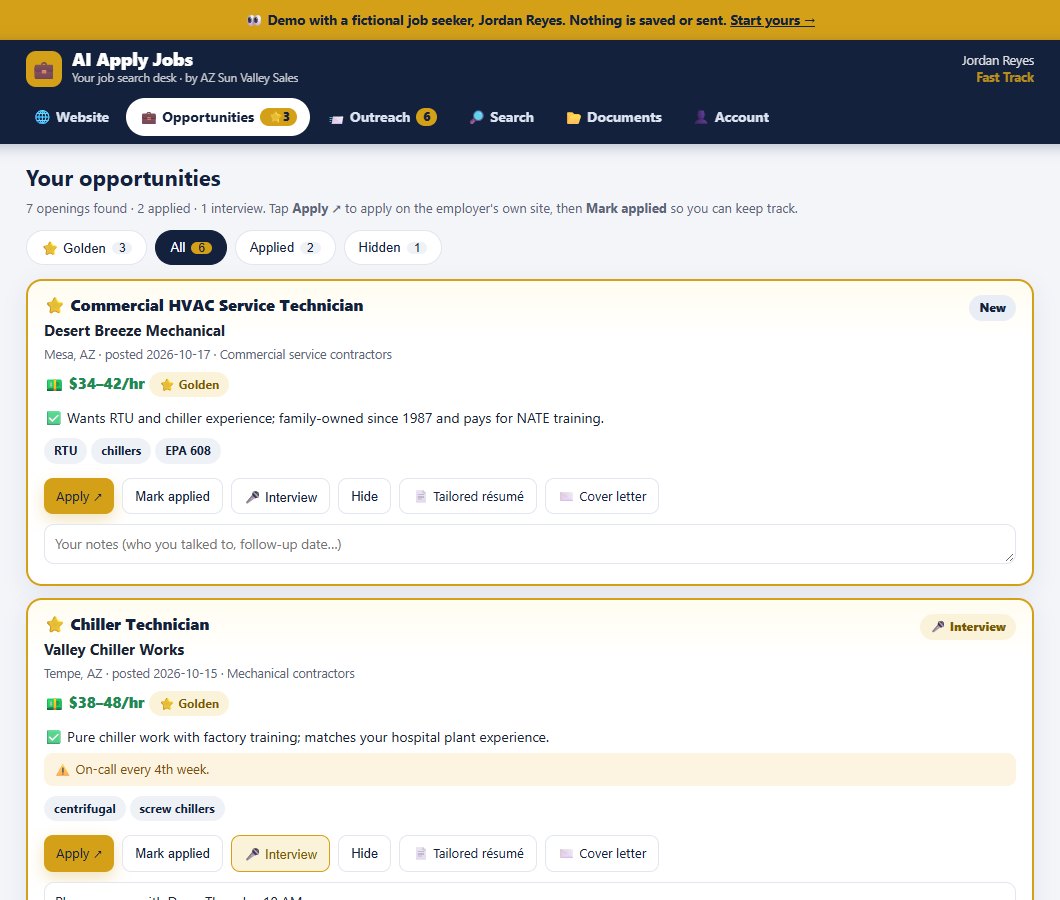
- Real openings that fit you: posted jobs in your field, in the places you want to work, at the pay you need. Each one goes on your desk with an Apply link to the employer's own site.
- Employers worth contacting directly: companies in your field that publish an HR, hiring-manager, careers or owner email, whether or not they have a posting up today.
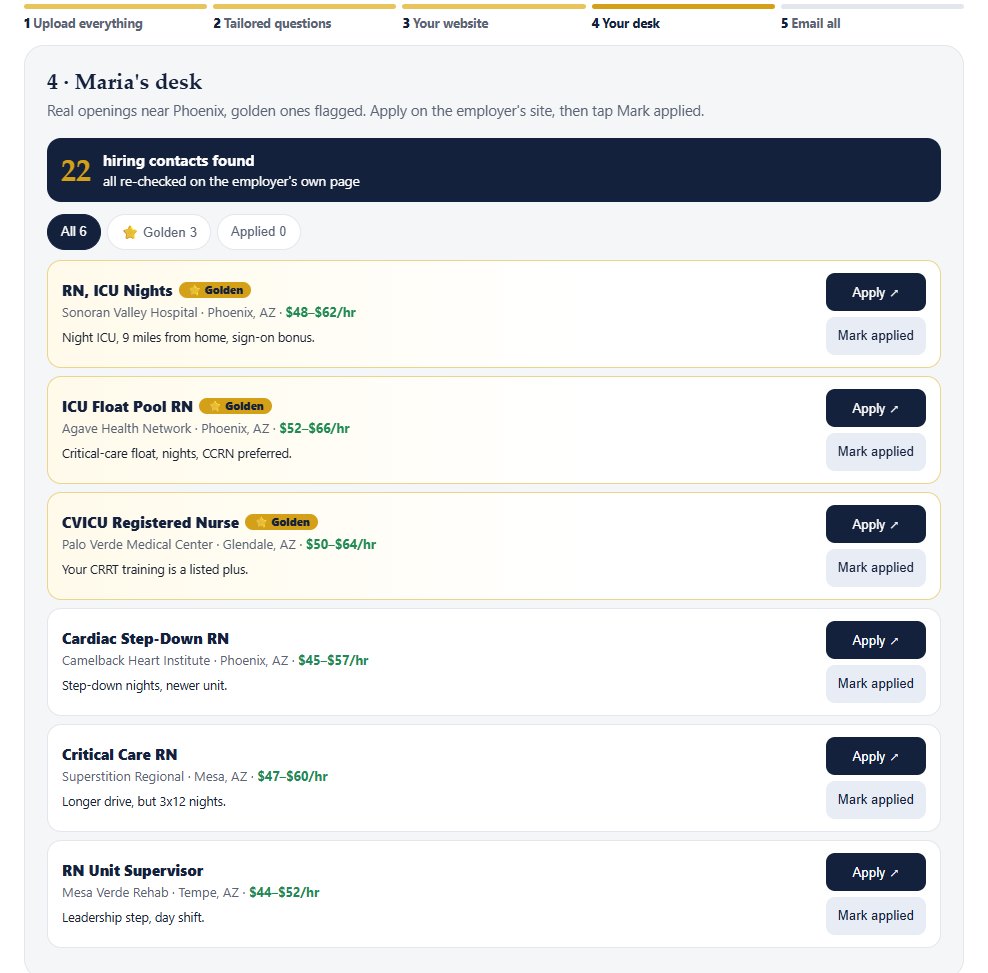
The best matches get a golden flag, so you can see at a glance which ones to jump on. You apply on each employer's site and tap Mark applied as you go. We do not submit applications for you; we find them, and we email the hiring managers.
The more you tell us, the better the matches
This is the most important thing in this article. The search is built from your own résumé, documents and answers. Generic input gets generic results. Specific input gets openings you would actually take. Here is what helps most:
Target roles
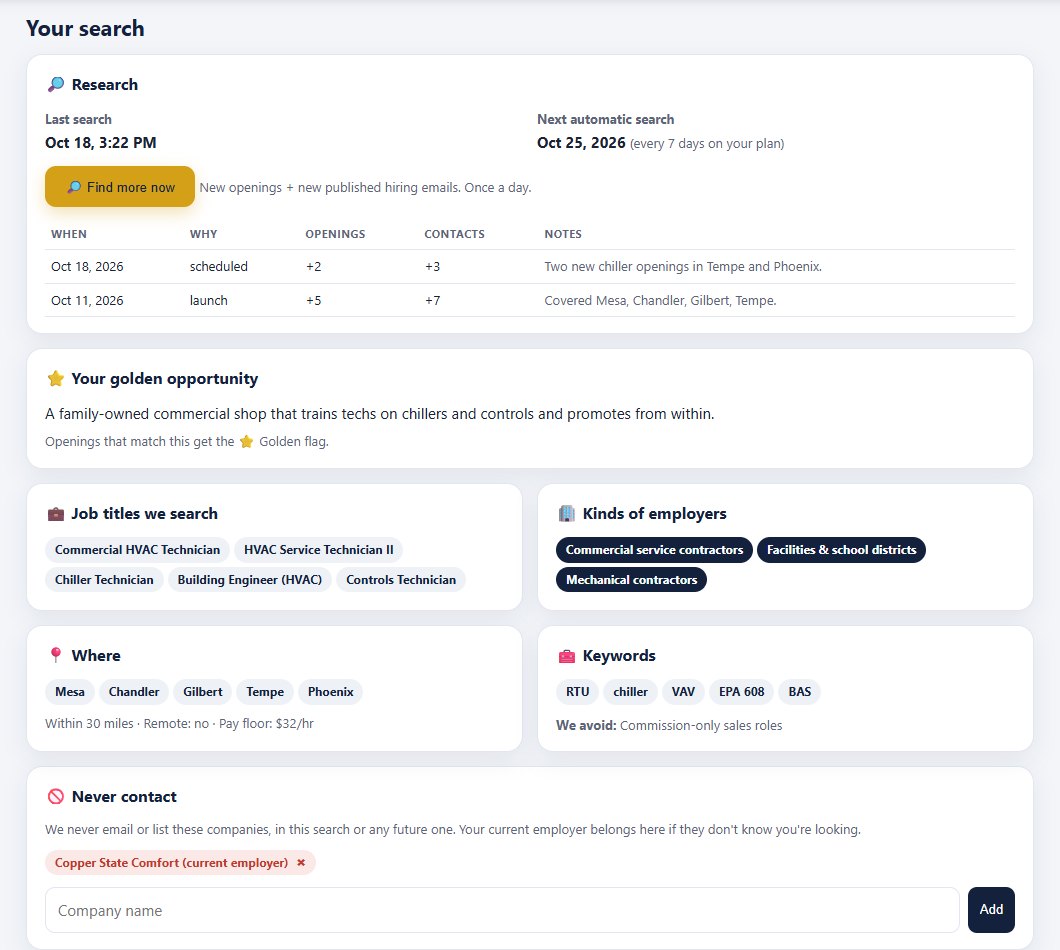
List the titles you want, including the ones next to your main role. An HVAC tech might add chiller technician, building engineer and controls technician. An office manager might add operations coordinator or bookkeeper. Each title widens the search in a useful direction.
Pay floor
Tell us the lowest pay you will accept. It keeps the desk free of jobs you would never take, and it helps the AI write letters for the right level of role.
Location, commute and remote
Name the cities you will work in and how far you will drive, and say whether you want on-site, hybrid or remote. "Mesa, Chandler, Gilbert, Tempe, within 30 miles, no remote" is far more useful than "Phoenix area".
Certifications and licenses
Upload them. A CDL, an RN license, an EPA 608, a forklift card or a QuickBooks certificate unlocks jobs that require them, and the AI can point to them in every letter.
Industries and kinds of employers
Do you want commercial service contractors or school districts? Hospitals or rehab centers? Construction, property management or medical offices? Tell us, and say what you want to avoid too, like commission-only sales.
Your golden opportunity
Describe the job you would jump at. "A family-owned commercial shop that trains techs on chillers and controls and promotes from within" gives the research a target, and openings that match it get the golden flag.
Your do-not-contact list
Add your current employer if they do not know you are looking, plus any company you do not want to hear from. We never email or list anyone on that list, in this search or any future one.
Ten minutes of detail at the start is the best investment you can make in your search.
Published emails only, re-checked, never guessed
Your name is on every email, so we treat it that way. AI Apply Jobs only uses hiring addresses an employer publishes itself, and each one is re-checked on the employer's own page before anything is sent. We never guess an address from a name pattern.
That rule costs us some reach, and we think it is worth it. An email to a published hiring inbox is an email the employer asked to receive. Nothing goes out until you review the list and tap Email all opportunities, and you can switch off any employer first.
Fresh research every month, or every week
Hiring changes constantly. New openings appear, old ones close, new employers start publishing hiring emails. Your plan includes a fresh search every month on Standard, or every week on Fast Track, so your desk keeps filling up for as long as you are subscribed. Each new search adds openings and new employers to contact, and you decide who gets an email.
A good time to start
Whether you are starting now, before the holidays, or planning a fresh push in January, the employers you reach first are the ones who see you first. If you want to know how much of the work AI can take off your evenings, read How efficient is applying for jobs with AI?, and for how every company gets its own letter, read Upload your résumé once: a custom cover letter for every company.
Standard is $99 setup plus $24.99 a month (up to 50 tailored employer emails at launch, 25 new contacts a month). Fast Track is $199 setup plus $49.99 a month (up to 100 at launch, 75 a month, weekly search). Prices as of October 2026; see current pricing. We cannot guarantee interviews, because hiring decisions belong to employers, but we can make sure the right people hear from you.
Questions about your field or your search? Real-person support from the owner, Johnathon Lawson: [email protected]. We are AZ Sun Valley Sales, a family business in Mesa, Arizona.
Frequently asked questions
Where do the openings come from?
The AI researches the web for real, current openings in your field and location, including jobs posted on employers' own websites, and lists them on your desk with links to apply on the employer's site.
How do you find hiring managers' emails?
We only use hiring, HR, careers or owner addresses that the employer publishes itself, and we re-check each one on the employer's own page before anything is sent. We never guess addresses.
Will you contact my current employer?
No. Add your employer and anyone else to your do-not-contact list, and we never email or list them. Your website is also hidden from Google by default.
What fields does the search work for?
Any field: trades, healthcare, office and admin, sales, warehouse and logistics, hospitality, tech, management and more. The search is built from your own résumé and answers.